Ralph-loop 2.0? The real autonomous coder is coming...
In a Nutshell
OpenAI's new "goal" feature in Codex replaces simple programmatic loops like Ralph Loop with an LLM-based judge that keeps agents working on complex tasks until an explicit definition of done is met. The feature excels at long-running coding work such as migrations, large refactors, and ambiguous goals like reducing Docker image size, provided the goal prompt clearly defines success criteria and validation methods. For multi-week or multi-month objectives, a new "mission" concept is being developed that schedules agent runs across hours, days, or weeks with human-in-the-loop oversight.
These notes were generated by AI and may contain inaccuracies.
OpenAI released the goal feature in Codex, allowing agents to continuously work for hours and hours on bigger and complex projects. Phenomenal results have been observed, including one prompt generating a fully functional game, and an agent building and testing an iOS app by itself for 6 hours. Key developers from the Codex team mentioned that this is probably the most consequential thing they have shipped in Codex this year. Very quickly, the Hermes agent also released the persist ghost feature, which is a similar type of feature allowing users to set a standing goal for the Hermes agent to work across turns until it is achieved.
The goal feature addresses the problem where models can get lazy and declare victory too early on complex projects. Even though models have gotten significantly better at consistently finishing well-scoped tickets, when given more complex projects, agents may work for 10 or 15 minutes and then claim to have fixed all issues, which is often not exhaustive. Users would need to keep prompting the agent with remaining issues.
A popular project earlier this year called Ralph Loop addressed this by running coding agents in a for loop. Every time an agent finished, it would write the output of its work in the file system and programmatically trigger the coding agent again. It was quickly implemented in Cloud Code through a plugin as well. However, Ralph Loop is fundamentally a simple programmatic loop - running the cloud through a specific prompt in a while loop and defining maximum iterations.
The goal feature in Codex and Hermes is an evolution of Ralph Loop. Instead of a simple programmatic loop, it uses a large language model to decide and judge whether a task has been satisfied. When a user sends out a goal command, it triggers the agent to do things. Once finished, there is one large language model call to decide whether the goal has been satisfied. If yes, the session finishes. If no, it triggers the agent again with some prompts. This prevents agents from prematurely claiming tasks are done.
The goal feature is good for handling ambiguous tasks. Instead of a list of well-scoped tasks, it can handle things like cutting a Docker image size by 60% where users might not know exactly how to achieve this at the beginning. The agent can start exploring, trying out multiple different methods and approaches, and making step-by-step improvements.
This approach is similar to the popular project Auto Research from Andrew Kapse earlier this year, which is fundamentally also a for loop that gets agents continuously working and saves state results. The goal feature is particularly good for complex long-running coding work like code migration, large refactors, as well as ambiguous goals like experiments where agents can keep making scoped progress.
Compared with the original Ralph Loop, the stop condition is no longer a programmatic manual limitation, but uses a large language model to judge and decide whether the goal is finished. When a new loop starts, instead of feeding an identical prompt.md into the agent loop, the goal feature has continuous prompts about goal context as well as state.
The loop works by sending finished work to a large language model call with a prompt that defines the definition of done, output format, as well as the goal and response. This large language model call can output status as well as reasoning. If it judges the goal is not finished, a message is sent back to the agent.
Users will see a status message, but in reality, the agent receives a message like "continuing toward your standing goal" that lists out the goal file and a special prompt to continuously work toward this goal and take the next concrete steps. If you believe the goal is completed, state it so explicitly and stop.
The Codex continuous prompt is more sophisticated, including instructions like "do not accept proxy signal as completion by themselves. It only marks the goal achieved when the audit shows the objective has actually been achieved, no required work remain. Then use this update goal with the status complete."
Codex goal feature asks the agent to mark the goal as complete by itself, versus Hermes agent which has a special large language model called judge result.
To activate the goal feature in Codex, run "Codex features list" to list all experimental features. Each one is labeled as stable or under development and whether it has been toggled on. Then run "Codex features enable goals" to see a success message.
When running Codex and using the /goal command, type out the goal. An example goal is: "help me migrate my code base from JavaScript to TypeScript and making sure all screens stay exactly same visually using Playwright interactive to verify the output." Once sent, it receives a goal active message and the agent starts working.
While working, users can run the goal command again to check status including how long it has been running and total tokens used. Users can also run "goal pause" or "goal clear" to stop work anytime. To ask questions or branch out a conversation while working, run the side command which forks the conversation from that point.
The goal feature has been used for migration work running for 9 hours overnight. However, grooves should be put in place to ensure the goal actually applies correctly.
A good goal prompt should be bigger than one prompt, but smaller than an open-ended backlog. It should define what Codex should achieve, what it should not change, how it should validate progress, and when it should stop. The most important part is that Codex should know what "done" means before it starts.
For migration tasks, the goal should look like: "migrate this project from legacy stack to a new stack, and making sure all screens stay exactly same visually, and using Playwright interactive to verify the output." This allows sculpted progress step-by-step.
For persistent goals, point to a plan.md file or PRD file, creating tasks for each milestone, and verify the output with Playwright interactive. Include reference screens as needed to verify whether game UI looks exactly the same as design.
If an evaluation set exists, run it like an auto research loop. Give it a goal to optimize prompts in the prompt file until the eval suite reaches target score. After each change, run the eval command, inspect failing cases, and keep the prompt at its minimum target. Stop when the target is met.
Vincent, one of the maintainers for Open Crawl, has been running goal for 3 days on Open Crawl across 13 rounds, using gazillion tokens and creating many PRs. One key learning is to spend time aligning with the agent early on. Simply pasting a prompt and asking it to do work is likely to give garbage results.
Instead, have a conversation with the agent about all context: what the project is, what things it cares about, what bad looks like for users, what has already been tried and ruled out, and what kind of box it keeps missing. Ask the model to ask anything before it starts. Initial interview alignment conversation is very critical.
It is also important to quantify "done." Avoid prompting things like "keep going until everything is fixed." When the definition of done is fuzzy, the model will either quit too early or spiral into nonsense. Give it some quantifiable number.
One QA prompt example defines pass with clear stop conditions: once 20 discrete new issues are found. For each issue, produce repo, proposed fix, push fix to a branch as you go, and log the result to .run folder.
For new projects, a prompt example includes: "we are building X reference implementation to different repos," pointing to a list of files including antipatterns, logs, and design patterns to follow, as well as what users would expect.
Even for new projects, it is very important to list out expected criteria and behavior rather than loose goals like "optimize or improve our app UX."
Having a good goal prompt is critical for getting good results. An open source project called Go Body helps construct good prompts. Run "NPX Go Body" and then run Codex. Using the $ sign will list all skills and plugins. Type "Go Prep" to load a workflow.
To trigger Codex, start an interview that constructs good prompt folders. Even with a vague goal like "build a rating type game using ImageGen for image assets and beautiful graphics, verify that on desktop," Go Body will start creating files.
One of the generated files is goal.md, which turns the goal into a well-written md file that clearly describes the requests, constraints, stop rules, and detail loop. It also has a state.yaml file listing out tasks based on the goal.
Instead of running a goal and passing a prompt, use /go and point to the goal.md file. Codex will start working on the task, update state.yaml file to keep a record and reference to goal.md file on every single loop.
With this approach, in just one single prompt, the agent is able to generate image assets for the game and stitch together a fully functional game.
The goal feature is good for complex coding work requiring hours to complete and addresses models' default behavior of stopping prematurely. However, it has limitations based on testing. It is mainly designed for longer coding sessions that run for hours. For things wanted over weeks or months like improving SEO or GEO strategy, or optimizing return on ad spending, it doesn't quite work because these scenarios don't have immediate verifiable results or feedback.
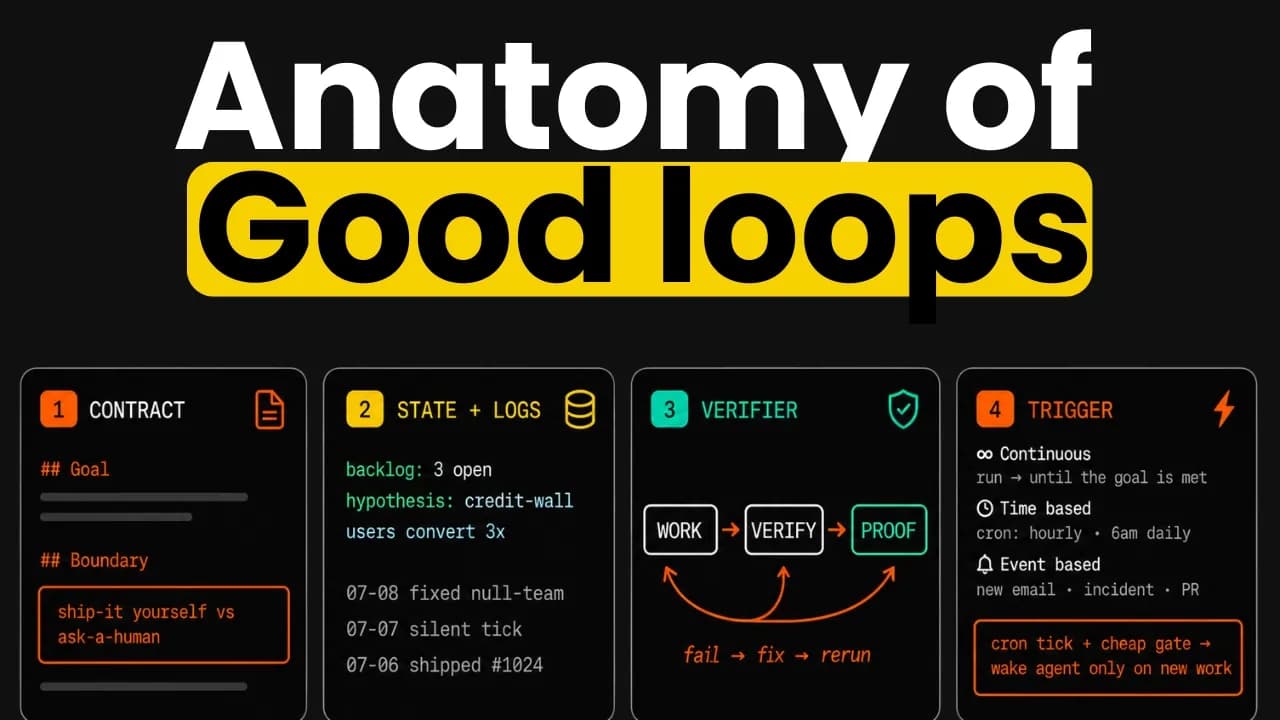
A concept called "mission" is being experimented with for long-running goals. Missions are captured into mission.md files that clearly define metrics to optimize. This triggers agent runs where agents form hypotheses about strategies to complete the mission, do one step, and output work as artifacts. Instead of just keeping running a for loop, it schedules the next run, which could be in hours, days, or even weeks depending on the situation.
Every time the next run is triggered, the new session receives the mission.md as well as previous steps summary. This allows iteration, improvement, and learning from previous steps.
For really long-running missions, human-in-the-loop experience is useful. If agents realize they want to try something really dramatic or realize a goal or mission is unclear or not verifiable, they can send messages to humans and change the mission status.
Long-running missions have been experimented with, like growing Twitter followers to 10,000. Agents iteratively take actions and run experiments. At each step, they can output artifacts like certain types of posts as well as specific analysis reports. Based on that, they form hypotheses and schedule next actions.
This has delivered interesting results. For Coolest own Twitter account, initially made a first tweet that got average performance. Based on observation, it decided next tweets should probably do a strat and use founder voice. The next one immediately got pretty good performance. Based on that observation, it decided to double down on this type of content and post next one, which was not explosive, but performance was much higher than the original baseline.
The same type of setup can be used for optimizing ad campaigns, SEO, and even product growth. Currently in open closed beta, early access program link is in the description.
Keep AI Jason in your library
Save the videos and channels worth coming back to, and find them again in one place.